
Issue
- How to add/remove the Carriage Return (CR) each scan?
- How to have the scanner automatically enter after each scan?
- The cursor does not move to the next line.
- How to auto ' enter ' after it scans
- Add an ' Enter ' after each scan.
Resolution
Scan the barcode below to program the scanner to add the CR after each scan. This will enable RetailPro to move to the next line and be in the position to scan the next item onto the invoice.
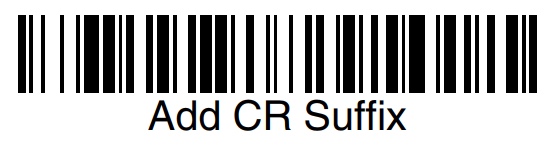
If needed, click here to factory reset the scanner. After resetting, scan the barcode above to add the CR suffix again.
Comments
0 comments
Article is closed for comments.